Which Pages to Submit to IndexNow, and How to Set It Up on Any Site
Google makes you publish, wait, request indexing, and wait again. Bing has a button. This is which pages to press it for, the setup for every common platform, and why it now decides whether ChatGPT can cite you.
Short answer
Submit a URL to IndexNow when it is new, meaningfully changed, deleted or redirected. Do not submit unchanged pages, noindex pages or non-canonical URLs. Plugins and Cloudflare do this for you on publish; everything else is one API call.
What IndexNow Does
IndexNow is a protocol that lets your site tell a search engine the moment a page is published, changed or removed. Your site sends a short ping with the URL. The engine receives it in seconds and queues the page, instead of finding it on its next crawl whenever that happens to be. It is free, open, and documented at indexnow.org. One ping reaches every participating engine: Bing, Yandex, Naver, Seznam and Yep share submissions with each other. Google does not take part.
The reason to care in 2026 is not Bing's own search share. It is that ChatGPT search draws on Bing's index when it goes looking for something to cite. A page that is not in Bing cannot be cited by ChatGPT search. A page that lands in Bing this afternoon can. That makes this the fastest lever most sites have for showing up in AI answers, and almost nobody has turned it on.
Which Pages to Submit
IndexNow is a change notification, not a sitemap. The rule is simple: submit a URL when something happened to it, and only the version of it you want indexed.
Submit
- New pages. The moment they go live: posts, product pages, landing pages, docs.
- Pages you meaningfully changed. New copy, a price or stock change, a new section, fixed facts. Not a typo or a CSS tweak.
- Deleted pages. Once they return 404 or 410, so Bing drops them instead of showing a dead result.
- Redirected pages. The old URL, once the redirect is live, so Bing moves its record to the new one.
Skip
- Unchanged pages. Resubmitting them does nothing and spends your crawl quota.
- noindex pages. You are asking Bing to crawl a page you told it not to index.
- Non-canonical URLs. Parameters, tracking tags, ?p=123 style IDs, filtered and sorted views. Submit the canonical only.
- Your whole site, or old changes. IndexNow is for recent changes. Your sitemap covers everything else.
Two cases trip people up. Deleted and redirected pages belong on the submit list: telling Bing a page is gone is how a dead URL leaves the index quickly instead of lingering for weeks. And the URL has to be the canonical one. WordPress users have reported the official plugin sending plain ?p=123 post ID URLs instead of the permalink; if your IndexNow report in Bing Webmaster Tools shows URLs you would never link to, fix that before anything else.
Every submission counts against your crawl quota, so volume is not free. For content that changes often, like prices or stock, submit when the change matters to a searcher and leave at least five minutes between resubmits of the same URL. Subdomains are separate hosts, and each one needs its own key.
The Setup, by Platform
First, the baseline. Every option below assumes your site is verified in Bing Webmaster Tools. If it is not, sign in and choose Import from Google Search Console: it copies your verified sites across in one click, no DNS records to add. Then submit your sitemap once under Sitemaps. IndexNow is what makes everything after the baseline fast.
Then find your row below. Do that row and stop.
| You are on | Do this | Time |
|---|---|---|
| WordPress (Rank Math) | Rank Math > Dashboard > Modules > turn on Instant Indexing. Free plan. | 1 min |
| WordPress (Yoast) | Yoast SEO > Settings > Site features > IndexNow. Yoast Premium. | 1 min |
| WordPress (neither) | Install Microsoft's own IndexNow plugin from the plugin directory. It generates and hosts the key for you. | 2 min |
| Any site proxied through Cloudflare | Cloudflare dashboard > Caching > Configuration > Crawler Hints > on. Cloudflare sends the IndexNow ping for you. | 1 min |
| Shopify / Webflow / other hosted | An IndexNow app from your platform's app store, or Bing Webmaster Tools > URL Submission by hand. | 2 min per batch |
| Custom site | Generate a key, host it as a .txt at your root, call the IndexNow API on publish. Code below. | 15 min once |
WordPress
If you already run Rank Math, open its dashboard, go to Modules and switch on Instant Indexing. It generates the key, hosts it, and pings on every publish and update from then on. It is in the free plan. Yoast has the same switch under Site features, but only in Premium. If you use neither, Microsoft publishes an official IndexNow plugin that does exactly one thing.
Whichever you pick, publish a test post and check the IndexNow report in Bing Webmaster Tools a few minutes later. You should see the URL with a timestamp, and it should be the pretty permalink, not a ?p= URL.
Cloudflare
If your site is proxied through Cloudflare (orange cloud), you do not need a plugin at all. Under Caching, then Configuration, turn on Crawler Hints. Cloudflare watches for pages whose content changed and sends the IndexNow pings itself, only to engines that have not seen the new version yet. This is the answer for custom-built sites, static sites, and anyone who does not want to touch their CMS. It is on the free plan.
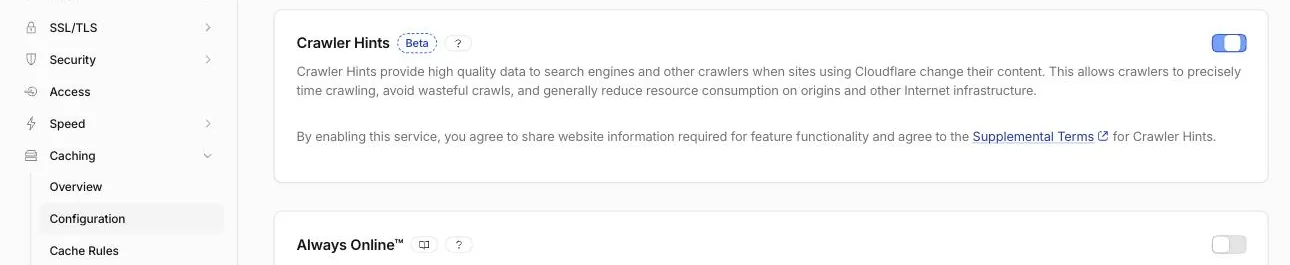
It only sees traffic your own Cloudflare zone proxies. A record set to DNS only (grey cloud) gives it nothing to watch, which is how a Shopify merchant in Shopify's community forum ended up with Crawler Hints on and Bing still reporting IndexNow as off.
Shopify, Webflow and other hosted platforms
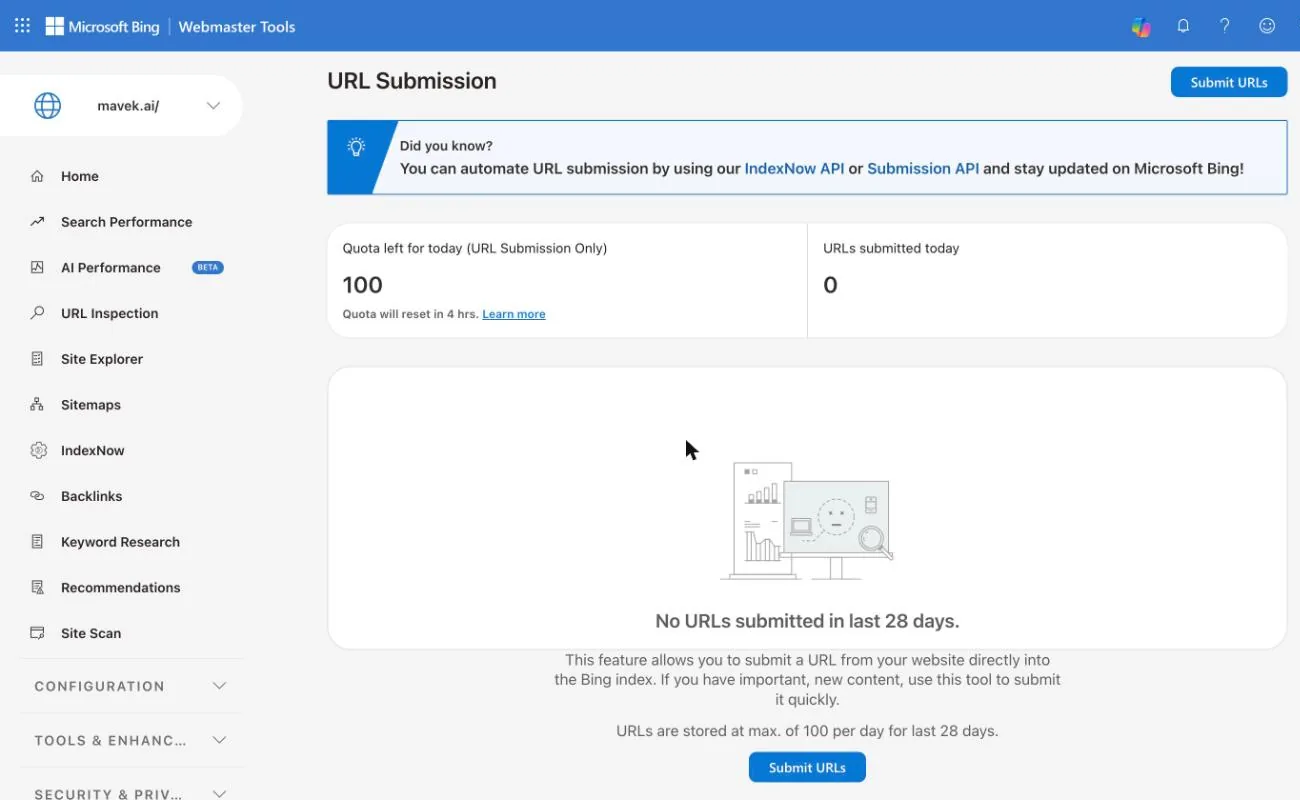
The protocol needs a key file on your domain, and hosted platforms generally will not let you put one at the root. You have two routes. The automated one is an app: Shopify's app store has several IndexNow apps that submit new and edited products and collections for you; pick one with recent reviews. The manual one is Bing Webmaster Tools, URL Submission in the left menu: paste what you published or changed, within the daily quota shown on the page, and Bing treats them the way it treats an IndexNow ping. The quota is set per site and can be small: mavek.ai gets 100 a day, which is one more reason to automate with IndexNow where you can.
Custom Sites: The API
Three steps. Generate a key (8 to 128 characters of letters, numbers and dashes; Bing will generate one, or use the button in the submitter below). Host it at your root as a text file named after the key, containing only the key:
https://example.com/3f9c2a7e1b8d4c6fa0e5b2d9c7a4f1e8.txt

3f9c2a7e1b8d4c6fa0e5b2d9c7a4f1e8
Then send URLs. One URL is a GET request:
curl "https://api.indexnow.org/indexnow?url=https://example.com/new-page/&key=YOUR_KEY"A batch is a POST, up to 10,000 URLs at once. This is the version to automate:
curl -X POST "https://api.indexnow.org/IndexNow" \
  -H "Content-Type: application/json; charset=utf-8" \
  -d '{
    "host": "example.com",
    "key": "YOUR_KEY",
    "urlList": [
      "https://example.com/new-page/",
      "https://example.com/updated-page/",
      "https://example.com/deleted-page/"
    ]
  }'
The same call from your publish hook, in the three languages people ask for most:
JavaScript (Node 18+)
// Call this after the page is live, with the canonical URLs that changed.
export async function pingIndexNow(urls) {
  const res = await fetch("https://api.indexnow.org/IndexNow", {
    method: "POST",
    headers: { "Content-Type": "application/json; charset=utf-8" },
    body: JSON.stringify({ host: "example.com", key: process.env.INDEXNOW_KEY, urlList: urls }),
  });
  if (!res.ok) throw new Error(`IndexNow ${res.status}`);
}
Python (standard library)
import json, os, urllib.request

def ping_indexnow(urls):
    body = json.dumps({"host": "example.com", "key": os.environ["INDEXNOW_KEY"], "urlList": urls})
    req = urllib.request.Request(
        "https://api.indexnow.org/IndexNow", data=body.encode(),
        headers={"Content-Type": "application/json; charset=utf-8"}, method="POST")
    return urllib.request.urlopen(req).status
PHP
$body = json_encode([
  'host' => 'example.com',
  'key' => getenv('INDEXNOW_KEY'),
  'urlList' => $urls,
]);
$ch = curl_init('https://api.indexnow.org/IndexNow');
curl_setopt_array($ch, [
  CURLOPT_POST => true,
  CURLOPT_POSTFIELDS => $body,
  CURLOPT_HTTPHEADER => ['Content-Type: application/json; charset=utf-8'],
  CURLOPT_RETURNTRANSFER => true,
]);
curl_exec($ch);
$status = curl_getinfo($ch, CURLINFO_HTTP_CODE);
If you would rather use a library, IndexNow for Python wraps the same calls and can submit straight from a sitemap. If your key cannot live at the root, host it anywhere on the same host and pass its URL as keyLocation; the key then only covers URLs under that folder, so the root is still the better choice.
How mavek.ai does it
This site is static and deploys on every push to main, so the ping runs from the same place. A GitHub Action diffs the push, works out which page URLs changed, waits until those URLs appear in the live sitemap, then submits them in one batch. Waiting on the sitemap solves two problems at once: we never ping before the deploy has landed, and pages we keep out of the sitemap never get submitted.
# .github/workflows/indexnow.yml
on:
  push:
    branches: [main]
jobs:
  submit:
    runs-on: ubuntu-latest
    steps:
      - uses: actions/checkout@v4
        with: { fetch-depth: 0 }
      - run: node scripts/indexnow.mjs
        env:
          BEFORE_SHA: ${{ github.event.before }}
          AFTER_SHA: ${{ github.sha }}

# scripts/indexnow.mjs, in three steps:
# 1. git diff BEFORE..AFTER under src/pages  -> candidate URLs
# 2. poll the live sitemap until they appear  -> deploy has landed,
#    and pages we keep out of the sitemap never get submitted
# 3. POST whatever is live to api.indexnow.org in one batch
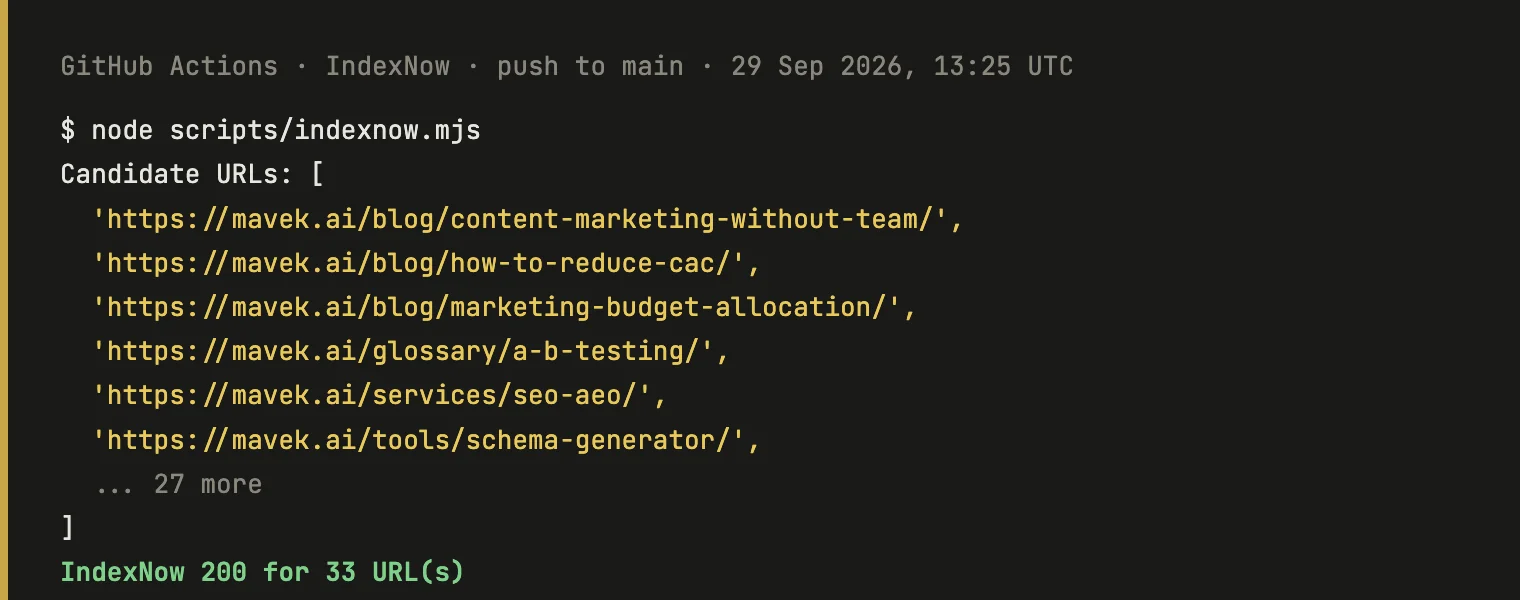
It has run on every push since 17 September 2026: 30 runs at the time of writing, none failed. One push on 29 September sent 33 URLs in a single request and got a 200 back.
Free IndexNow Submitter
For a one-off batch, or to test a new key before you automate anything. Paste URLs from one host, one per line. Your key file has to be live on that host first, or you will get a 403.
Check It Worked
The API answers with a status code and nothing else. Here is what each one means and what to do about it:
| Code | Means | What to do |
|---|---|---|
| 200 | Received. Nothing else to do. | Nothing. It does not mean indexed, only received. |
| 202 | Received, key not verified yet. | Normal on a first submission. The engine will fetch your key file. |
| 400 | Bad request. | Check the JSON: host, key and urlList are all required. |
| 403 | Key not valid. | The key file is missing, not at the root, or does not contain the key. |
| 422 | URLs do not match the host or the key. | Every URL must be on the host you declared. Subdomains count as separate hosts. |
| 429 | Too many requests. | Slow down. Batch URLs into one POST instead of one request per URL. |
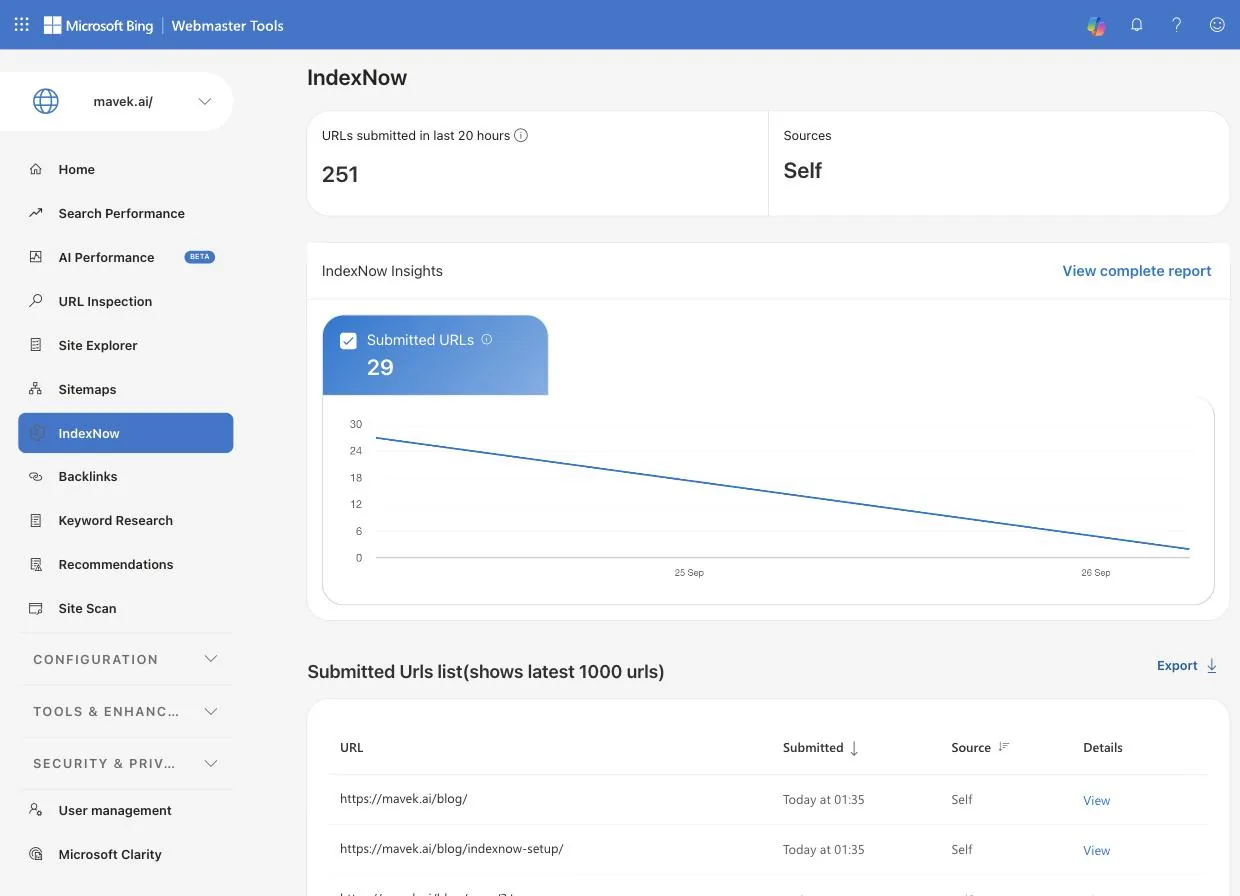
A 200 means received, not indexed. To see what Bing did with it, open Bing Webmaster Tools and go to IndexNow. The report, which Bing expanded into IndexNow Insights in 2024, shows how many URLs you submitted and when. Judge by the count: the URL list underneath only shows the latest 1,000 URLs, so older submissions drop off it. To confirm a specific page made it in, use URL Inspection in the same tool.
Then check that it mattered. The payoff of being in Bing is being citable in ChatGPT search, and that is something you can measure: ask the questions your buyers ask and see whether your pages come back. That is what Mavek's AI visibility tracking does every week.
Common Mistakes
- Key file in the wrong place. It has to be at the root (example.com/yourkey.txt) and contain only the key, unless you pass keyLocation.
- Key file blocked. A robots.txt rule, a firewall or a bot-protection setting that stops engines fetching the .txt means every submission fails verification.
- Submitting the wrong version of the URL. http vs https, www vs non-www, trailing slash vs none. Submit exactly the canonical URL.
- One request per URL. Batch them. One POST takes up to 10,000 URLs, and single pings in a loop are what trigger a 429.
- Pinging on every save. Autosaves and cosmetic edits are not changes. Wait at least five minutes before resubmitting the same URL.
- Submitting URLs that do not work yet. Ping after the deploy is live, not when the build starts, or Bing crawls a 404.
What to Do for Google
IndexNow will not get you into Google faster. Google runs on sitemaps, internal links and its own crawl schedule. For a page that matters, open Search Console, paste the URL into URL Inspection and click Request Indexing. The daily quota is small, so save it for pages that count. If a page will not index at all, the reason is in its verdict; our guide to Search Console indexing verdicts covers what each one means and how to fix it.
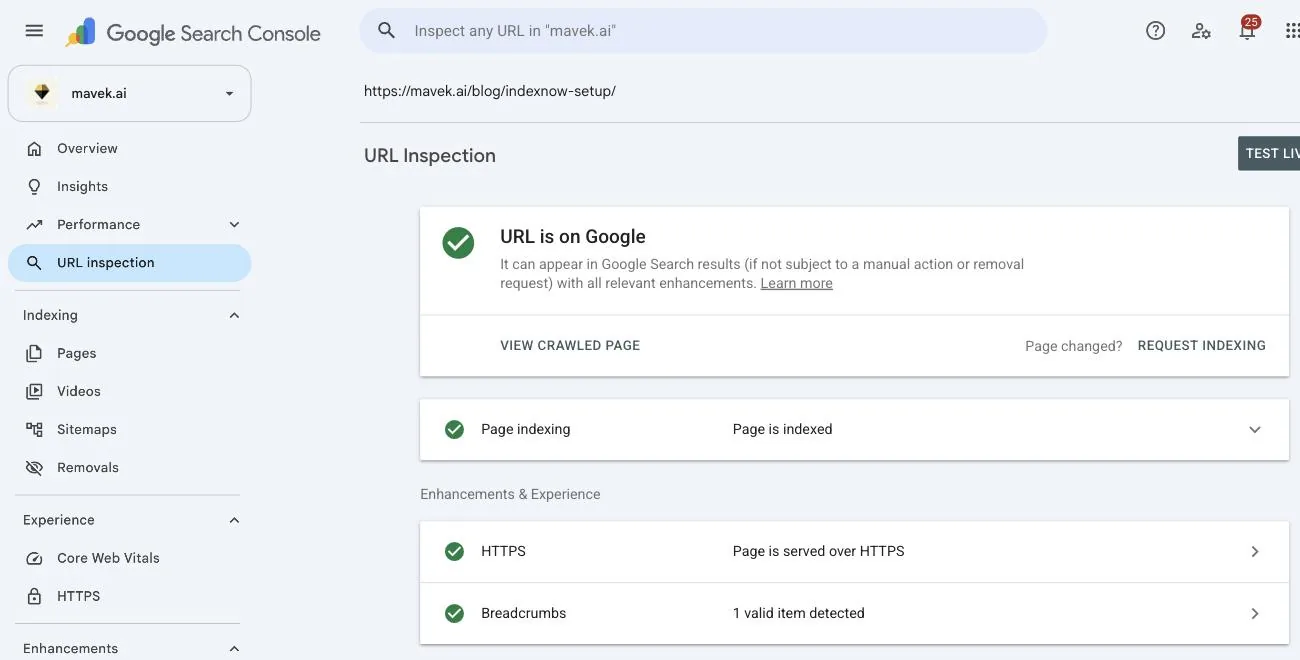
Run both tracks. Sitemaps and internal links for Google, IndexNow for everyone else. Nothing about your rankings changes on its own; what changes is the delay between publishing something and it being eligible to rank, or to be cited, on the Bing side.
Frequently Asked Questions
What pages should I submit to IndexNow?
New pages, pages whose content meaningfully changed, and pages you deleted or redirected. Skip unchanged pages, noindex pages, non-canonical URLs such as parameter or ?p= versions, and anything that changed before you set IndexNow up. Your sitemap covers those.
What is IndexNow?
IndexNow is an open protocol, started by Microsoft Bing and Yandex, that lets a website tell search engines the moment a page is published, updated or deleted. Instead of waiting to be crawled, the site sends a short ping with the URL, and the engine that receives it shares it with every other participating engine.
Does Google support IndexNow?
No. Google has said it is testing it but does not accept IndexNow pings today. For Google you still rely on sitemaps, internal links and the Request Indexing button in Search Console. IndexNow is for Bing, Yandex, Naver, Seznam, Yep and the AI search products that read those indexes.
Is IndexNow free?
Yes. The protocol is open, there is no account, no fee and no per-URL charge. The plugins and the Cloudflare toggle that send pings for you are free as well, apart from Yoast, where IndexNow is a Premium feature.
Why does Bing indexing matter for ChatGPT?
ChatGPT search draws on Bing's index as one of its main sources when it looks something up. If a page is not in Bing, ChatGPT search has nothing to cite. Getting into Bing quickly is the closest thing there is to getting into ChatGPT quickly.
How fast does IndexNow actually work?
The ping is received in seconds. Indexing is not guaranteed and Bing still decides whether the page is worth keeping, but a normal page on a site in good standing typically shows in Bing within hours rather than the days or weeks a crawl-based discovery takes.
Can I submit my whole site?
You can, but you should not. IndexNow is meant for recent additions, changes and deletions, and every submitted URL counts against your crawl quota. Submit your sitemap once in Bing Webmaster Tools for the full site, and use IndexNow for what changes from then on.
Is there a limit?
The IndexNow API accepts up to 10,000 URLs per POST request. Bing Webmaster Tools URL Submission has a separate daily quota per site, shown on that page; mavek.ai's is 100 a day. Engines do not publish a hard daily IndexNow cap; if you get a 429, you are sending too fast.