Bing AI Performance Report: The Free Tab That Logs Every Time an AI Cited Your Website
The Bing AI Performance report is a free report in Bing Webmaster Tools that counts every time Microsoft Copilot and Bing's AI answers cited your site, lists the pages they cited, and shows the grounding queries the AI searched before citing you. mavek.ai got 578 AI citations in 3 months. Google Search Console has no equivalent report.
How Do You Open the AI Performance Report?
- Go to bing.com/webmasters and sign in. A Google account works.
- Click Import and pick your site from Google Search Console. Bing copies the verification, so there is no meta tag or DNS record to add.
- Left menu, AI Performance. It sits under Search Performance with a BETA label.
- Change the date range from 30 D to 3 M. Citations are lumpy day to day; three months shows the pattern.
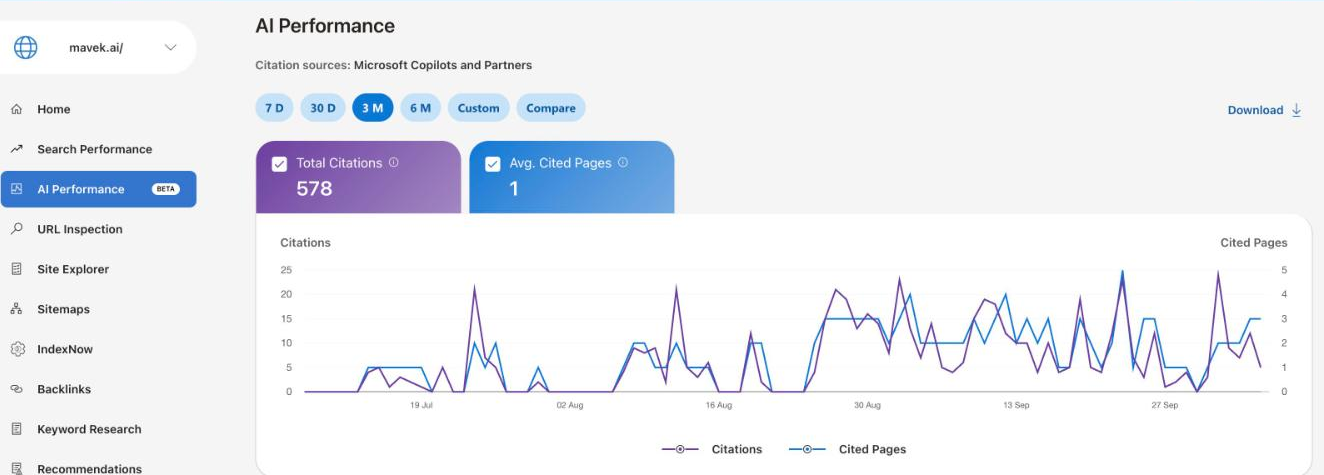
The top of the report has two numbers. Total Citations is how many times an AI answer linked to your site. Avg. Cited Pages is how many of your pages get cited on an average day. The header line says where the data comes from: Microsoft Copilots and Partners.
Which Pages Does Copilot Cite?
Scroll down to List By and click Pages. Every URL that got cited, with its citation count.
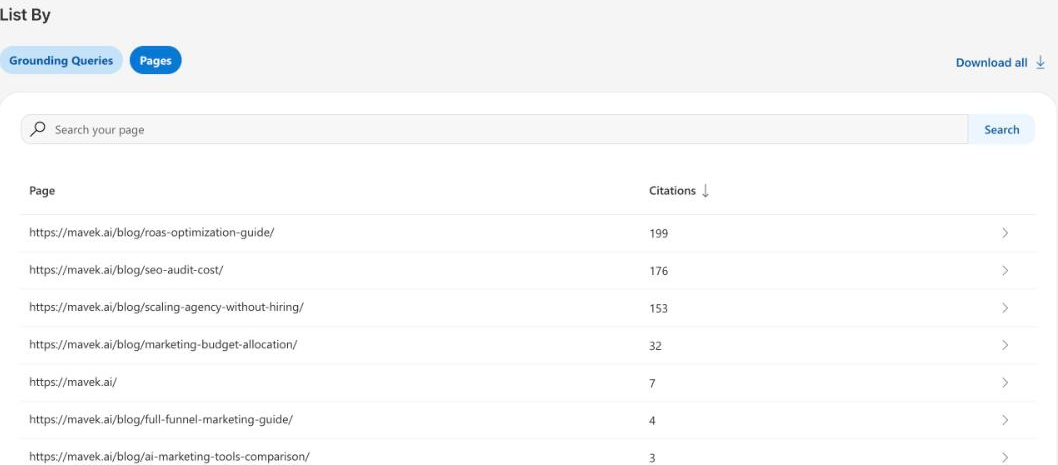
On mavek.ai one post, the ROAS optimization guide, took 199 citations, and the top three posts took 91% of the total. Search Influence saw the same shape on their own site in February 2026: one page took 69% of 19,717 Copilot citations across 86 cited pages (Search Influence). AI citations concentrate. Find your two or three pages and protect them first.
What Are Grounding Queries?
Grounding queries are the searches the AI ran on Bing to find sources right before it cited you. They are not your keywords and not what the person typed into Copilot. Click Grounding Queries next to Pages.
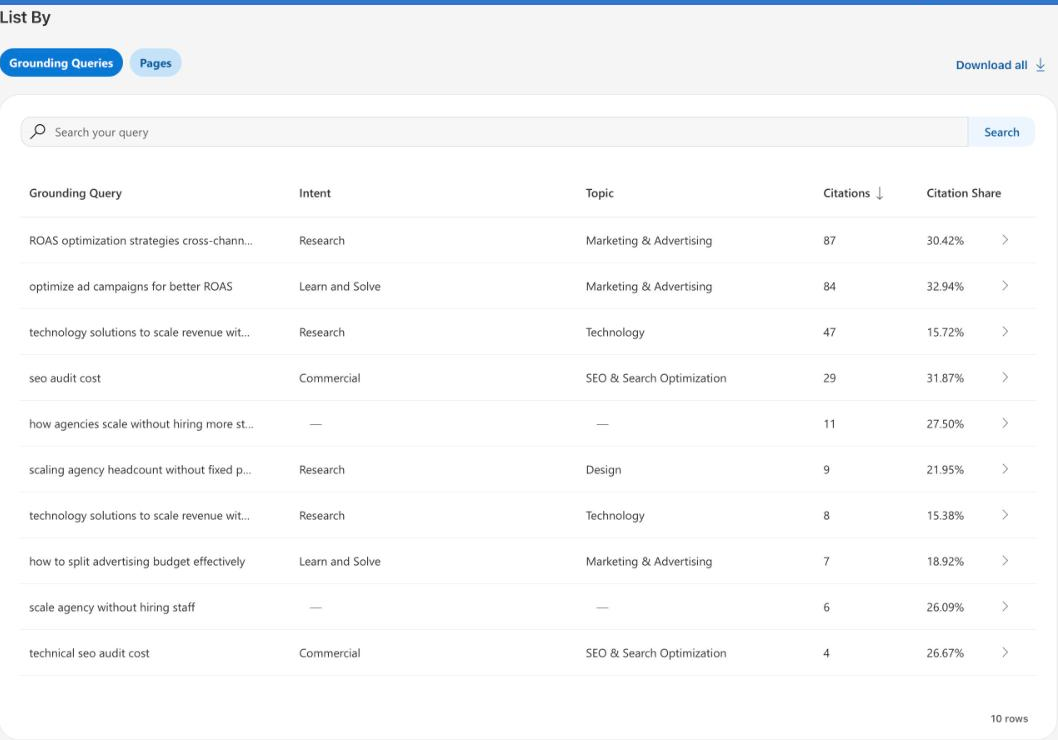
mavek.ai's top grounding queries are about ROAS and scaling an agency without hiring: "ROAS optimization strategies cross-channel ROI campaigns" with 87 citations and "optimize ad campaigns for better ROAS" with 84. Mavek never targeted either as a keyword. That is the point of the tab: it shows the questions an AI already uses your site to answer, which are often not the ones you wrote for.
Citation Share is your share of all citations Bing gave for that query. 30.42% on the first row means mavek.ai was one of the main sources every time Copilot searched it.
How Do You Turn the Export Into a Fix List?
- Click Download all on the Grounding Queries tab, then on the Pages tab. Two CSV files.
- Paste both into Claude with the prompt below. It matches each query to a page and gives each one an action.
- Start with the top 20 rows. These are questions you are already the answer to. Refresh those pages first: current numbers, a current date, and a first paragraph that answers the query in one sentence.
These are two CSV exports from Bing Webmaster Tools, AI Performance: Grounding Queries and Pages. My site is [domain]. My business is [what you sell, for whom].

1. Match each grounding query to the page it most likely got cited for, using the Pages export. If you cannot tell, say so.
2. For each query give one action:
   - REFRESH: the page answers it, update the facts, date and first paragraph so it keeps getting cited.
   - EXPAND: the page touches it, add an H2 section that answers the query directly.
   - NEW PAGE: no page really answers it, and it fits my business.
   - IGNORE: it does not fit my business.
3. Sort by citations, highest first.

Output a table: grounding query, citations, page, action, one line on what to change. Then list the 5 changes to make this week.
If you would rather keep it in a sheet, use these five columns. One row per grounding query.
| Column | What goes in it |
|---|---|
| Grounding query | The phrase Copilot searched before it cited you. Paste from the Grounding Queries export. |
| Citations | How many times that query led to a citation in the window you picked. |
| Page cited | The URL from the Pages export that answers it. Claude matches these; check the top 10 by hand. |
| Action | Refresh, expand, new page, or ignore. |
| Done | The date you made the change. Re-export in 30 days and compare the citations for that page. |
Why refresh first: Search Influence's citations fell 97% from a December average of 1,520 a day to 34 a day in February, and they read it as a freshness effect. One site, one quarter, so treat it as a warning, not a rule. Pages that already get cited are the cheapest to keep cited.
What Does the Report Not Cover?
It covers Microsoft Copilot, Bing's AI summaries and select partner integrations. It does not cover ChatGPT, Perplexity, Gemini, Claude or Google AI Overviews, and there is no API yet; the data leaves as CSV. For the other engines, run the manual AI visibility check: your buyer's questions, five runs each, the cited pages in a sheet. And if an AI engine cannot read your site at all, check whether Cloudflare is blocking AI bots before anything else.
Key Takeaways
- Bing Webmaster Tools, AI Performance, is free and shows total AI citations, cited pages and grounding queries.
- Import your site from Google Search Console in one click; no new verification needed.
- Grounding queries are the AI's own searches before it cited you. They often differ from the keywords you targeted.
- Citations concentrate: on mavek.ai three posts took 91%. Refresh the cited pages first.
- It covers Copilot and Microsoft partners only. Google Search Console has no AI citation report.
Frequently Asked Questions
What is the Bing AI Performance report?
It is a free report in Bing Webmaster Tools that shows how often Microsoft Copilot and Bing's AI answers cited your site, which pages they cited, and the grounding queries behind each citation. Microsoft launched it as a public preview in February 2026 for any verified site.
Does it show ChatGPT citations?
No. The report header says Citation sources: Microsoft Copilots and Partners. That covers Copilot, Bing's AI summaries and select partner integrations, not ChatGPT, Perplexity, Gemini or Google AI Overviews. For those you have to check by hand or use a tracker; the manual AI visibility check on this blog shows how.
What are grounding queries?
The searches the AI ran on Bing to find sources before it wrote its answer. They are not what the person typed into Copilot. A person asks a long question; Copilot turns it into one or more short searches, and the grounding query is that search. It is the closest thing to the AI's own keyword list for your site.
Does Google Search Console have an AI report?
No. On 8 October 2026 Search Console has no separate report for AI Overviews or AI Mode citations. Clicks from AI Overviews are mixed into the normal Performance report with no filter to separate them. Bing is the only one of the two that shows AI citations as their own report.
Why does my report show zero citations?
Three common reasons: the site was verified less than a month ago, the site is not indexed well in Bing (check Search Performance and Site Explorer in the same tool), or Copilot simply has not cited you yet. Submit your sitemap, use IndexNow for new pages, and check again after 30 days.
Is there an API for the AI Performance report?
Not yet. Search Influence reported in February 2026 that there is no API and Microsoft said it is on the backlog. Today the data comes out through the Download and Download all buttons as CSV.