Cloudflare Was Hiding My Website From ChatGPT: The 10-Second Test and the Fix
Cloudflare can block ChatGPT, Claude and Perplexity at the edge with a 403 while your robots.txt says allow, because Cloudflare answers the request before robots.txt is read. On mavek.ai in June 2026 five AI crawlers got 403 and Googlebot got 200. Run the curl lines below, then set the three rows in Cloudflare's Configure AI bot policies to Allow.
How Do You Test If Cloudflare Blocks ChatGPT?
Open Terminal on a Mac, PowerShell on Windows, or Claude Code. This is the command from the video. Swap yoursite.com for your domain and press enter:
curl -I -A "ClaudeBot" https://yoursite.comLook at the first line it prints. HTTP/2 200 means ClaudeBot got in. HTTP/2 403 means Cloudflare turned it away. Then repeat it for the other bots. These lines do all of them at once and print only the status code:
curl -s -o /dev/null -w "%{http_code}\n" -I -A "ChatGPT-User" https://yoursite.com/
curl -s -o /dev/null -w "%{http_code}\n" -I -A "OAI-SearchBot" https://yoursite.com/
curl -s -o /dev/null -w "%{http_code}\n" -I -A "GPTBot" https://yoursite.com/
curl -s -o /dev/null -w "%{http_code}\n" -I -A "ClaudeBot" https://yoursite.com/
curl -s -o /dev/null -w "%{http_code}\n" -I -A "Claude-User" https://yoursite.com/
curl -s -o /dev/null -w "%{http_code}\n" -I -A "PerplexityBot" https://yoursite.com/
curl -s -o /dev/null -w "%{http_code}\n" -I -A "Perplexity-User" https://yoursite.com/
curl -s -o /dev/null -w "%{http_code}\n" -I -A "Google-Extended" https://yoursite.com/
curl -s -o /dev/null -w "%{http_code}\n" -I -A "Googlebot" https://yoursite.com/- 200 means the bot got the page.
- 403 means something at the edge refused it. If Googlebot gets 200 and the AI bots get 403, it is almost always a Cloudflare bot setting, not your server.
- 301 or 308 is a redirect. Add a trailing slash or the www version and run it again.
What mavek.ai returned in June, before the fix: ClaudeBot 403, GPTBot 403, OAI-SearchBot 403, PerplexityBot 403, CCBot 403, Googlebot 200. Today every line returns 200.
Why Does robots.txt Say Allow and ChatGPT Still Get a 403?
robots.txt is a file the bot reads after it reaches your server. Cloudflare is the door in front of the server. If Cloudflare's bot policy says Block, the request ends at the door with a 403 and the bot never sees robots.txt. The file can welcome GPTBot all day; the edge decides. That is how mavek.ai shipped a fully open robots.txt and llms.txt and was still unreadable to every AI engine the week before launch.
Where Is the Cloudflare AI Bot Setting?
- Open dash.cloudflare.com and pick your domain.
- Security, then Settings. Scroll to the Bot traffic section.
- Click Configure AI bot policies. A modal opens with three rows: Search, Agent, Training.
- Set all three rows to Allow (do not block). Search, Agent and Training. Click Save. (Training is the only one you can argue about; see the table below.)
- Run the curl lines again. The AI bots should now return 200.
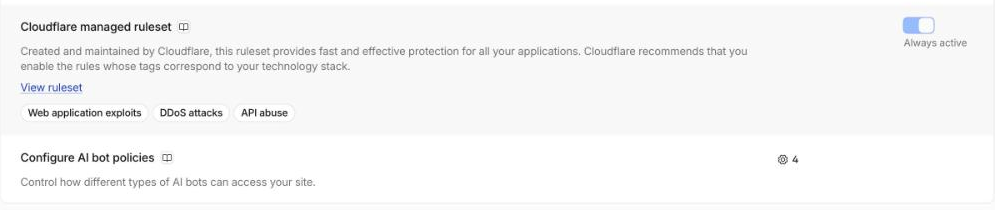
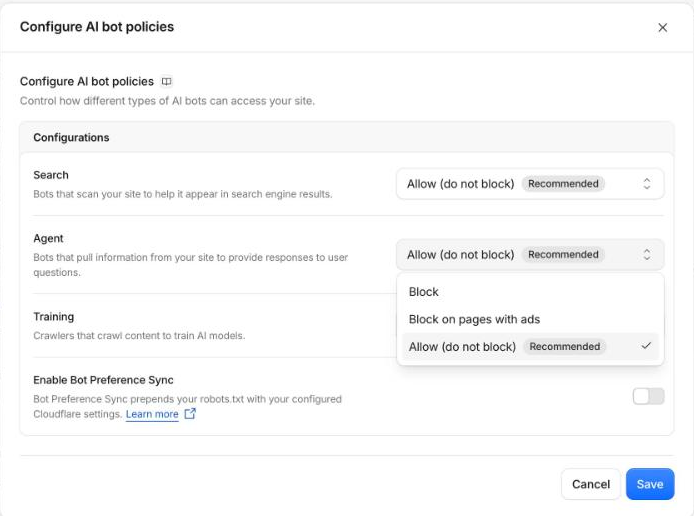
Cloudflare replaced the single Block AI bots toggle with this modal in July 2026 and deprecated the toggle on 15 September 2026 (Cloudflare docs). From the same date, new domains get Training and Agent blocked on pages that display ads, with Search allowed. If your site runs ads, check this even if you never touched the setting.
What Do Search, Agent and Training Mean?
| Row | What Cloudflare means | Bots | Set it to |
|---|---|---|---|
| Search | Crawlers that collect or index your content to answer questions about it later. | OAI-SearchBot, PerplexityBot, Claude-SearchBot | Allow (do not block) |
| Agent | Bots acting in real time for a person, like the fetch ChatGPT makes the second someone asks about you. | ChatGPT-User, Perplexity-User, Claude-User | Allow (do not block) |
| Training | Crawlers that take content to train models, including mixed-purpose crawlers used for training and search. | GPTBot, ClaudeBot, CCBot, Meta-ExternalAgent | Your call. Blocking it also blocks the mixed-purpose crawlers. |
Agent is the one that hurts most when it is blocked. When someone asks ChatGPT about your product, ChatGPT-User fetches your page in that second. Blocked, ChatGPT answers from whatever else it can read, which is usually a competitor's comparison page.
Which Bot Is Which in AI Crawl Control?
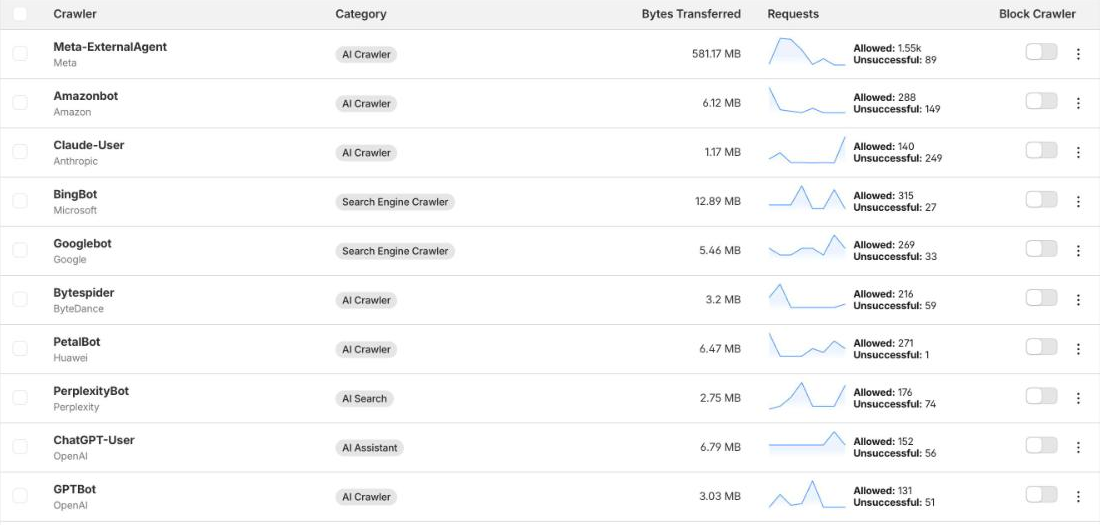
Left menu, AI Crawl Control, Security. Every bot that hit your site in the last 7 days, by name, with Allowed and Unsuccessful counts and a Block Crawler switch per bot. This is the table from mavek.ai on 8 October 2026, with Cloudflare's own category labels.
| Bot | Company | Cloudflare category |
|---|---|---|
| GPTBot | OpenAI | AI Crawler |
| ChatGPT-User | OpenAI | AI Assistant |
| OAI-SearchBot | OpenAI | AI Search |
| ClaudeBot | Anthropic | AI Crawler |
| Claude-User | Anthropic | AI Crawler |
| PerplexityBot | Perplexity | AI Search |
| Meta-ExternalAgent | Meta | AI Crawler |
| Amazonbot | Amazon | AI Crawler |
| Bytespider | ByteDance | AI Crawler |
| Googlebot | Search Engine Crawler | |
| BingBot | Microsoft | Search Engine Crawler |
The labels here are not the same as the three policy rows. AI Crawl Control files Claude-User under AI Crawler, while the policy modal treats user-triggered fetches as Agent. Go by the bot's name, not the label.
Unsuccessful is not the same as blocked. It counts 404s, redirects and errors too. Claude-User shows 249 unsuccessful on mavek.ai with every policy on Allow, mostly old URLs. Open a row and check the status codes before you flip anything.
What Should robots.txt Say?
Once Cloudflare lets the bots in, robots.txt is the second gate. These lines allow the AI bots by name. Put them at the top of yoursite.com/robots.txt and keep any Disallow rules you already need (admin, cart, internal search) under them.
User-agent: GPTBot
Allow: /

User-agent: OAI-SearchBot
Allow: /

User-agent: ChatGPT-User
Allow: /

User-agent: ClaudeBot
Allow: /

User-agent: Claude-User
Allow: /

User-agent: PerplexityBot
Allow: /

User-agent: Perplexity-User
Allow: /

User-agent: Google-Extended
Allow: /

User-agent: *
Allow: /
Key Takeaways
- Cloudflare answers before robots.txt. A robots.txt that says allow does not stop a 403 at the edge.
- The test: curl with each AI bot's name. 403 for the AI bots and 200 for Googlebot means a Cloudflare bot setting.
- The fix: Security, Settings, Bot traffic, Configure AI bot policies. Set all three to Allow; Training is the only one worth debating.
- Since 15 September 2026 new Cloudflare domains block Training and Agent on pages with ads by default.
- AI Crawl Control, Security shows every bot by name with Allowed and Unsuccessful counts. Unsuccessful includes 404s, not only blocks.
Frequently Asked Questions
Does Cloudflare block ChatGPT by default?
It depends on when the domain was added and what was switched on. Before July 2026 Cloudflare had a single Block AI bots toggle, and a self-reported check of 50 SaaS sites on Reddit in May 2026 found 41% had it on. Cloudflare replaced it with Configure AI bot policies and deprecated the old toggle on 15 September 2026. From that date new domains get Training and Agent bots blocked on pages that show ads, with Search allowed. Run the curl test to see what your site does today.
My robots.txt allows GPTBot. Why does it still get a 403?
robots.txt is a request, read by the bot after it reaches your site. Cloudflare sits in front of your server and answers before robots.txt is ever read. If a Cloudflare bot policy says Block, the bot gets a 403 at the edge and never sees the file. On mavek.ai in June 2026 robots.txt and llms.txt both welcomed every AI crawler while ClaudeBot, GPTBot, OAI-SearchBot, PerplexityBot and CCBot all got 403.
If curl returns 200, is the real bot definitely getting in?
Not always. curl only sends the bot's name. Cloudflare can also check whether the request comes from the bot's real IP range, so a spoofed request and the real crawler can be treated differently. A 403 on curl is a strong sign of a block. A 200 is a good sign, and AI Crawl Control > Security is the real record: it shows each bot's Allowed and Unsuccessful requests over the last 7 days.
What does Unsuccessful mean in AI Crawl Control?
Any request that did not get a normal page back. That includes blocks, but also 404s, redirects and errors. On mavek.ai on 8 October 2026 Claude-User showed 140 allowed and 249 unsuccessful with every policy on Allow, so a high Unsuccessful count alone does not prove a block. Open the bot's row and check the status codes before you change anything.
Should I block the Training bots?
That is a business decision. Search and Agent bots are the ones that let ChatGPT, Perplexity and Claude read your page when someone asks about you, so keep those on Allow. Training bots feed future models. Some brands block them to keep content out of training data; others allow them so the next model knows the brand. Blocking Training also blocks the mixed-purpose crawlers Cloudflare files under it.
What is Bot Preference Sync?
A switch in the same modal. Cloudflare says it prepends your robots.txt with your configured Cloudflare settings, so the file and the edge say the same thing. Leave it off if you maintain robots.txt by hand and want full control of the file.
Once the bots can read you, check whether they recommend you: the manual AI visibility check shows who ChatGPT and Perplexity name instead of you.