Google Keyword Planner for Free: Semrush-Level Keyword Data Without Running Ads
Before I got addicted to Ahrefs and Semrush, this is what I did to save about $100 a month. Google Keyword Planner gives you volume, competition and cost per click for hundreds of keywords per topic, from Google's own data, for nothing. This page has every click with screenshots, the sheet that combines your downloads, and the Claude prompts that turn the list into pages.
Step 1: Get Into Keyword Planner Without Paying
- Search "Google Keyword Planner" and click Start now. It takes you into Google Ads account creation.
- Skip the campaign setup. Google will push you to build a campaign. Skip it. If you see "Switch to Expert Mode" or "Create an account without a campaign" at the bottom of the screen, take that; it is the shortest route.
- It will ask for your payment information. You will not be charged. Nothing is billed until a campaign exists and is switched on. Add the card, confirm, and move on.
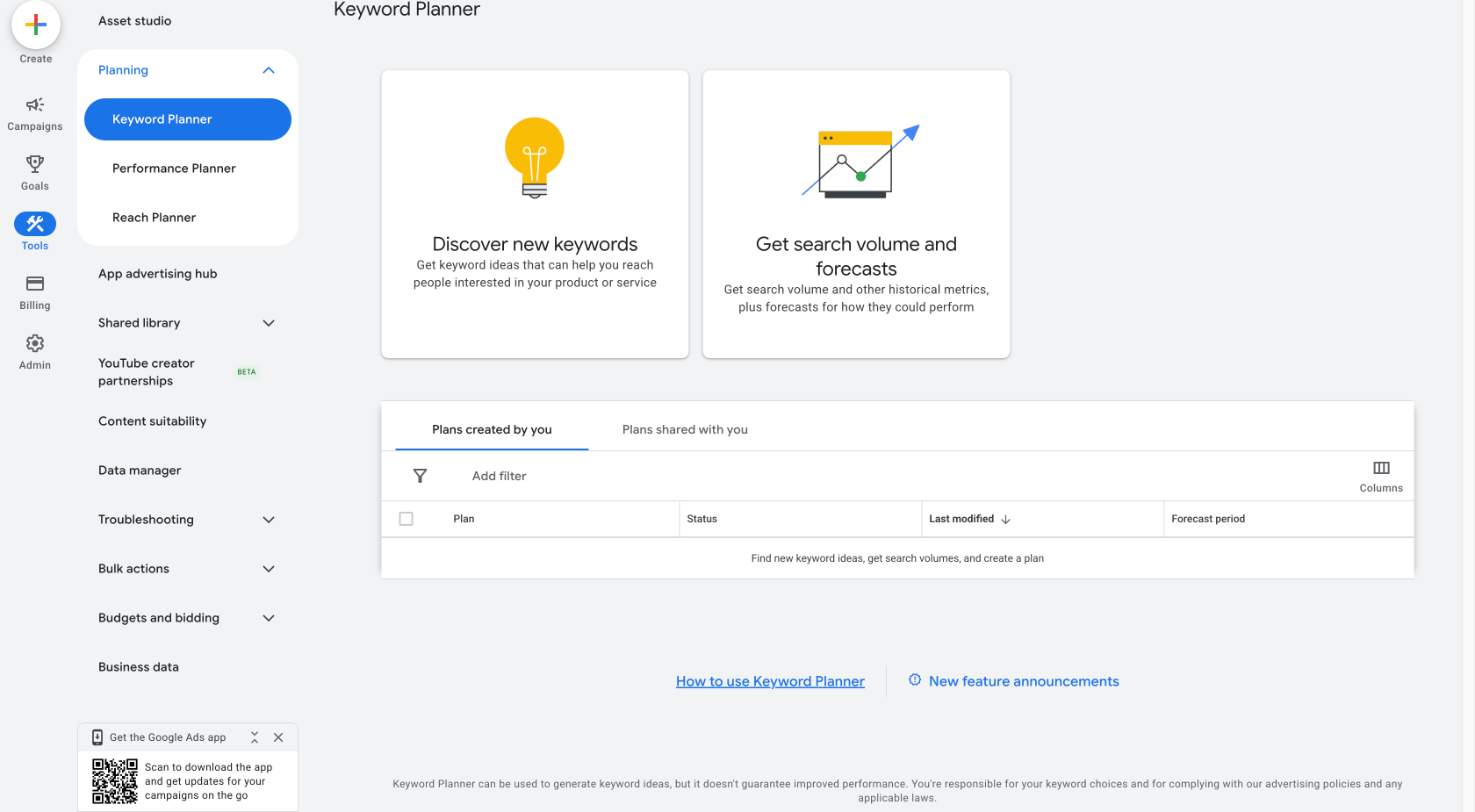
- Open Tools, then Planning, then Keyword Planner.
Step 2: Discover New Keywords
- Click Discover new keywords.
- Enter three terms that describe your business. Products or services, not slogans. Check the language and country under the box; they default to your account's settings.
- Click Get results.
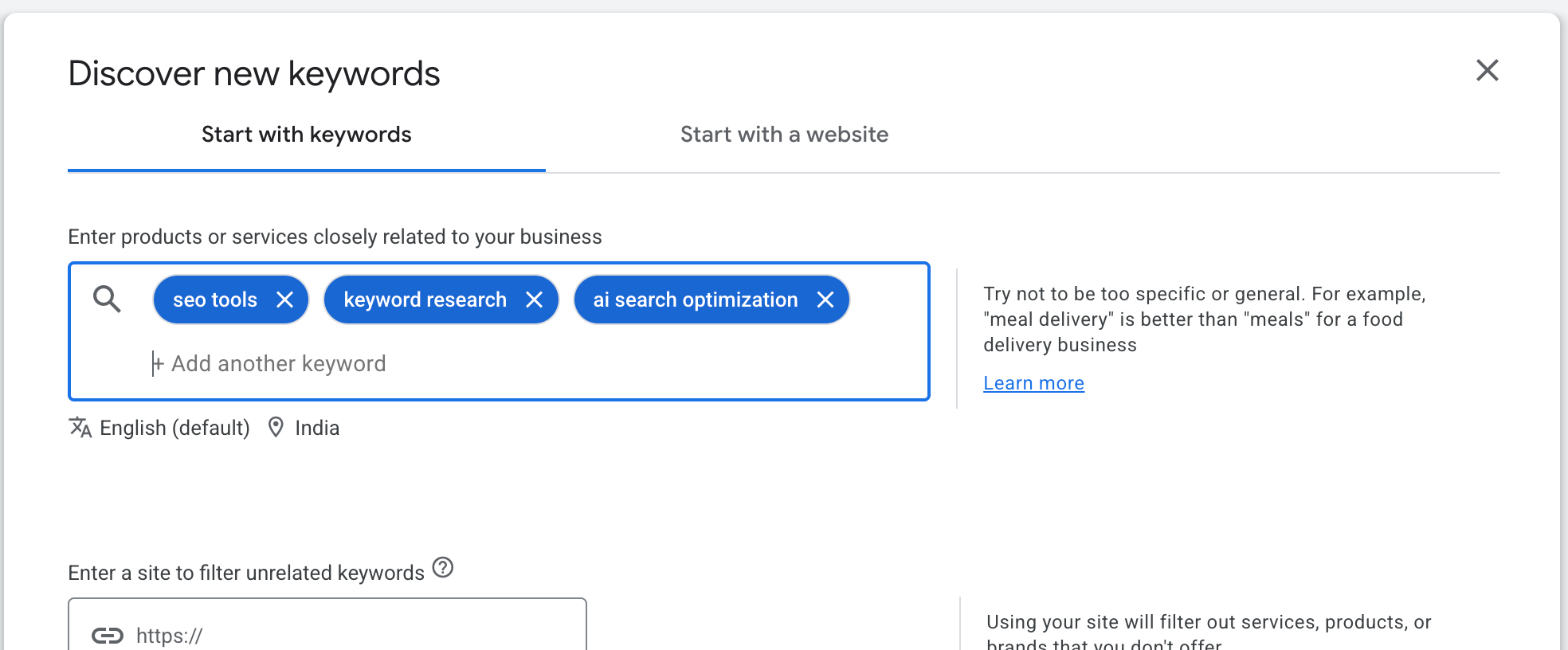
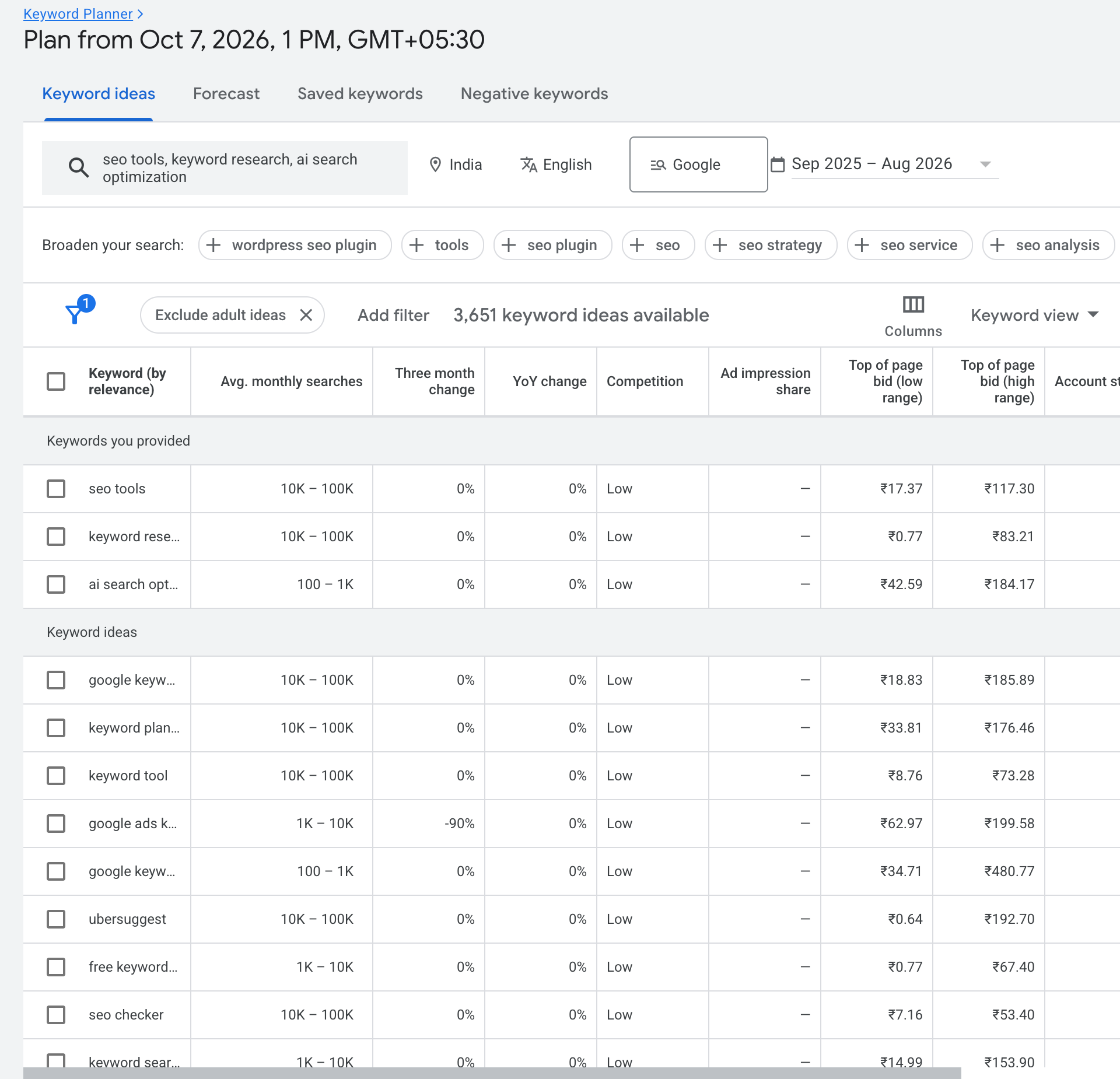
You get hundreds of keyword ideas related to the three terms, each with monthly searches, the three-month and year-on-year change, competition, and the top-of-page bid range. The run in the screenshot returned 3,651 ideas from three seeds.
Step 3: Download the Report
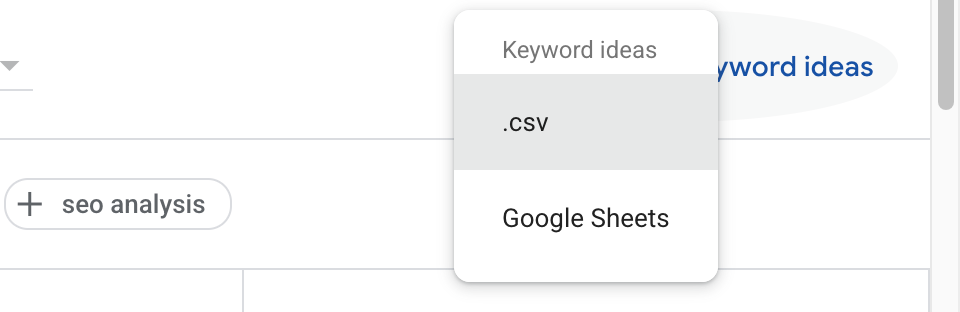
- Click Download keyword ideas at the top right of the table, then choose .csv or Google Sheets.
- That is the report. It is the same keyword table Semrush and Ahrefs charge $129 to $140 a month for, from the source they calibrate against.
- Repeat for every topic your business covers. One run per topic, three seeds each. You do not have to touch Ahrefs or Semrush again until you want the things they do that Google does not: difficulty scores, backlinks, rank tracking.
What Is in the Download
| Column | What it means |
|---|---|
| Keyword | The search term. Close variants appear as separate rows at the same volume, which is why the combine step matters. |
| Avg. monthly searches | Rounded monthly volume in the country you picked. 5,000 means somewhere around 5,000, not exactly. |
| Three month change / YoY change | Whether demand is rising. 900% YoY on a term usually means a new product category or a news spike. |
| Competition | Advertiser competition (Low, Medium, High), not organic difficulty. A Low term can still be hard to rank for. |
| Top of page bid (low / high) | What advertisers pay per click. The best free proxy for what a keyword is worth to a business. |
| Searches: month by month | Twelve monthly columns. Seasonality is in here; most people never look. |
The file is tab-separated and saved as UTF-16, so it looks broken if you double-click it. Open it with File, Import in Google Sheets, or pick the Google Sheets download option in the first place.
Step 4: Combine the Sheets With Claude
After five or six topics you have five or six downloads with overlapping keywords. Keyword Planner lists close variants at a shared volume, so the same demand shows up more than once. Two ways to combine them:
The sheet. Make a copy of the template. Paste every download into the Exports tab and the Combined tab builds itself: each keyword once, the highest volume seen, competition, bids, and how many exports it appeared in. The Clusters tab takes the output of the next step and maps cluster and page back onto every keyword.
The prompt. Paste the exports into Claude with this and it does the same job in one pass.
I have several Google Keyword Planner exports from the same account, one per topic. They are tab-separated files with these columns: Keyword, Currency, Avg. monthly searches, Three month change, YoY change, Competition, Competition (indexed value), Top of page bid (low range), Top of page bid (high range), then one column per month.

Combine them into one table with these rules:
1. One row per keyword. Keyword Planner repeats close variants across exports at the same volume; keep each keyword once.
2. Avg. monthly searches = the highest value seen for that keyword across the exports.
3. Keep Competition, Top of page bid (low range) and Top of page bid (high range) from the first export the keyword appears in.
4. Add a column "Seen in" with how many exports the keyword appeared in.
5. Drop any keyword with Avg. monthly searches below 100.
6. Sort by Avg. monthly searches, descending.

Give me the result as a table I can paste into Google Sheets, and tell me how many rows went in and how many came out.
Step 5: Clusters, Pages, Content
The combined list is still a list. The step that makes it a plan is grouping the keywords by intent and giving each group one page. Then you create the pages that do not exist and update the ones that do. The full clustering prompt, with the rules for intent, the volume floor and the "ignore this cluster" step, is on its own page: The Keyword Clustering Prompt. The short version to run right after the combine step:
Now take the combined table and group it into clusters by search intent, one page per cluster. Use the full clustering prompt at mavek.ai/blog/keyword-clustering-prompt for the rules. Output: keyword, cluster, page (URL or working title), intent.Paste the result into the Clusters tab of the template and the Combined tab shows every keyword with its cluster and page. Sort by volume, filter by cluster, and you have the order to write in. Once the traffic starts growing, you know where to send the thank-you. Keyword data is one half of the agency invoice Google gives away; the other half, directory listings, is two Google searches.
Frequently Asked Questions
Is Google Keyword Planner really free?
Yes. It lives inside a Google Ads account, and you need to create one to reach it. Signup asks for billing details, but nothing is charged until a campaign is created and switched on. You can use Keyword Planner for years without ever running an ad. Jeet's account in the screenshots has no active campaigns.
Why does the screen show ranges like 10K to 100K?
Accounts without ad spend see volume as a range in the interface. The download still gives one rounded figure per keyword (5,000, 50,000), which is what the sheet uses. Accounts with active campaigns see the rounded figures on screen too.
How accurate is Keyword Planner compared with Semrush or Ahrefs?
Semrush and Ahrefs estimate volume from clickstream panels and their own models, then calibrate against Keyword Planner. Keyword Planner is Google's own data, rounded and grouped. For deciding which topics to write about, the rounding does not matter. For a precise number on one keyword, no tool has it.
What do Semrush and Ahrefs give me that this does not?
Keyword difficulty scores, the current top 10 for every keyword, backlink data, rank tracking, and competitor keyword gaps. Those are real. Keyword volume and CPC for your topics is not one of them; Google gives you that for free.
How many seed terms should I enter?
Three at a time, per topic, like in the video. Keyword Planner accepts up to ten, but mixing topics in one run muddies the ideas it returns. Run one topic at a time and combine the exports afterwards.
What is the clustering step?
Once the exports are combined, you group the keywords by intent and assign each group a page. That is the step that turns a keyword list into a content plan. The clustering prompt on this site does it in one pass and is linked below.
Can I use the Start with a website tab instead?
Yes. It reads a site (yours or a competitor's) and returns the keywords Google associates with its pages. Useful for finding what a competitor is targeting, but it returns fewer ideas than seed terms, so run both.